Quick Answer (TL;DR)
This free PowerPoint template organizes your product initiatives by strategic themes rather than by quarter or team. Each theme gets a column with initiative cards ranked by priority tier (P0, P1, P2) and sized by effort. The result is a single-slide view showing where your investment is concentrated and whether it aligns with your product strategy. Download the .pptx, define your themes, and use it for strategic alignment conversations.
What This Template Includes
- Cover slide. Title slide with product name, planning period, and strategy owner.
- Instructions slide. How to define themes, assign priority tiers, and maintain the roadmap.
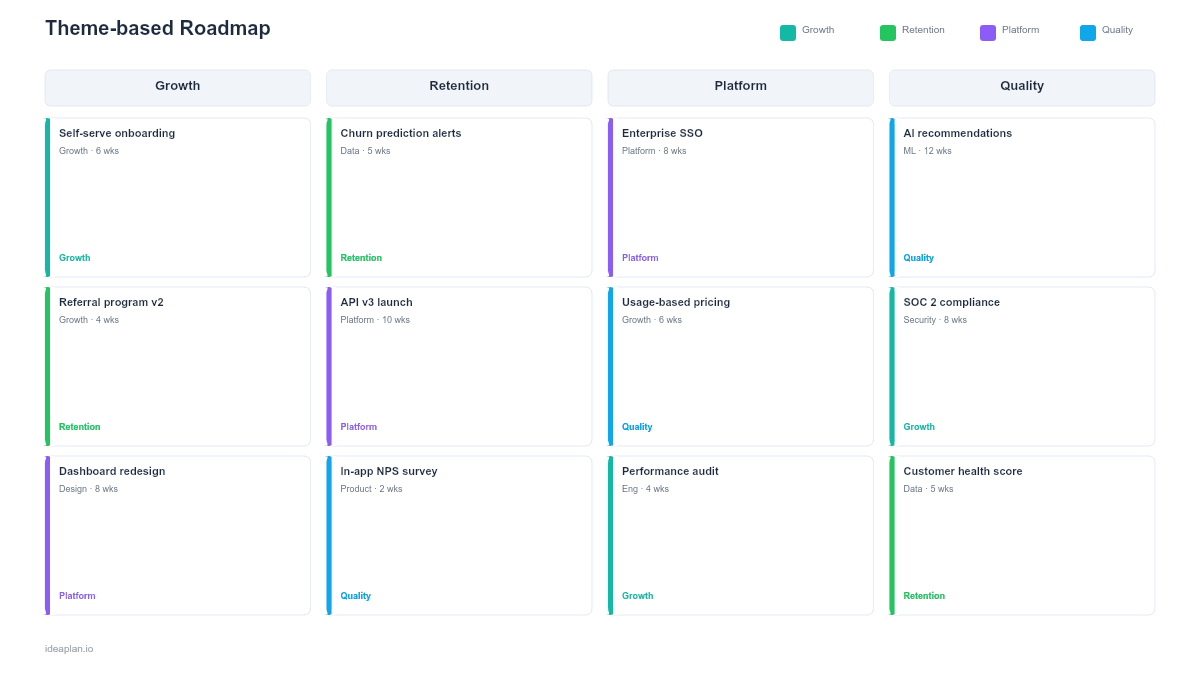
- Blank theme roadmap slide. Four theme columns with a priority tier legend (P0 Must-do, P1 Should-do, P2 Nice-to-have). Each column has dashed placeholders for initiative cards with size estimates.
- Filled example slide. A complete theme-based roadmap with four themes (Growth, Retention, Platform, Experience) and 14 initiatives distributed across priority tiers.
Why Organize by Theme
Most roadmaps organize by time: Q1, Q2, Q3, Q4. That structure works for execution planning but struggles at the strategic level. A theme-based roadmap answers different questions: Where is the team investing? Is investment balanced across strategic areas? Are we neglecting a theme that matters?
Themes also decouple planning from delivery dates. Instead of promising "SSO in Q2," a theme-based roadmap says "Enterprise readiness is a P0 theme; SSO is a P0 initiative within it." This framing gives the team flexibility on timing while maintaining clarity on direction. Product leaders at companies like Spotify and Intercom have written about this approach as a way to communicate strategy without creating date expectations that erode trust.
The theme-based format works especially well for product strategy presentations where the audience cares about where the team is heading, not when specific features ship.
Template Structure
Theme Columns
Four columns, one per strategic theme. Common theme patterns:
- By business objective: Growth, Retention, Efficiency, Compliance
- By user segment: Enterprise, SMB, Self-serve, Partners
- By product area: Core Product, Platform, Integrations, Analytics
- By customer journey: Acquisition, Onboarding, Engagement, Expansion
Choose themes that match your strategy. If the team is debating themes, that is a signal the product strategy needs clarification first.
Priority Tiers
Each initiative within a theme carries a priority tier:
- P0 (Must-do). Non-negotiable. Funded and staffed. Cutting these requires executive approval.
- P1 (Should-do). High value but flexible on timing. Staffed if capacity allows after P0 work.
- P2 (Nice-to-have). Valuable but deferrable. Fills remaining capacity or gets pushed to the next cycle.
The tiered model is more honest than MoSCoW in practice because it acknowledges that P1 and P2 items might not ship, rather than labeling everything as "Must" or "Should."
Size Estimates
Each initiative card includes a size estimate: S, M, L, or XL. The sizes map to rough effort ranges (e.g., S = 1-2 weeks, M = 3-4 weeks, L = 5-8 weeks, XL = 9+ weeks). Size estimates let leadership compare investment across themes. If the Growth theme has three XL initiatives and the Platform theme has four S items, the investment is heavily skewed toward growth. Which may or may not be intentional.
How to Use This Template
1. Define strategic themes
Start with your product vision and strategy. What are the 3-4 strategic areas the team must invest in over the next 6-12 months? Each theme should be broad enough to contain multiple initiatives but specific enough to guide prioritization.
2. Map initiatives to themes
Take your backlog of proposed initiatives and assign each to a theme. If an initiative does not fit any theme, it either reveals a missing theme or a misaligned initiative. Both are useful findings.
3. Assign priority tiers
Within each theme, rank initiatives as P0, P1, or P2. A healthy roadmap has 2-3 P0 items per theme and progressively more P1 and P2 items. If every initiative is P0, the prioritization is not doing its job. Push the team to make the hard trade-offs.
4. Add size estimates
Size each initiative relative to the others. Consistency matters more than precision. If the team debates whether something is M or L, it does not matter much. What matters is that S and XL items are clearly distinguished so investment balance is visible.
5. Review investment balance
Step back and look at the full slide. Is investment concentrated in one theme? Are all the large initiatives in one area? Does the priority distribution match the strategic intent? If the strategy says "double down on retention" but 80% of P0 items are in the growth theme, the roadmap contradicts the strategy.
When to Use This Template
Theme-based roadmaps work best for:
- Strategy alignment meetings where leadership reviews whether execution matches intent
- Annual and semi-annual planning where the team sets direction before committing to timelines
- Board presentations where the audience wants to understand strategic investment, not feature details
- New product leaders who need to communicate their strategic priorities to the team
If your audience needs delivery dates, layer a quarterly roadmap on top of the theme view. The two formats complement each other: themes define where to invest, quarters define when to deliver.
Key Takeaways
- Theme-based roadmaps show strategic investment balance rather than delivery timelines.
- Priority tiers (P0, P1, P2) are more honest than treating every item as "must-have."
- Size estimates (S/M/L/XL) make investment concentration visible across themes.
- Four themes is the sweet spot. Broad enough for strategic coverage, narrow enough for a single slide.
- Combine with a quarterly roadmap for audiences that need both direction and timing.
- Compatible with Google Slides, Keynote, and LibreOffice Impress. Upload the
.pptxto Google Drive to edit collaboratively in your browser.